
Use an interval based preventive maintenance checklist built around shift, weekly, monthly (approximately one month or roughly 160 to 200 hours), and 500/1000/2000 hour milestones. Cover coolant, lubrication, electrical cabinet hygiene, way care, and documentation at each stage. Operators handle the daily 10 to 20 minute pass; technicians own the deeper hour based work and sign off on anything that could shift accuracy.
TL;DR:
- Regular daily inspections include chip removal, coolant top-up, and toolholder checks to prevent most unscheduled downtimes, not annual overhauls.
- Weekly tasks focus on cleaning filters, inspecting the toolchanger, and lubing moving parts, with records used to identify patterns indicating needed repairs.
- Hour-based maintenance intervals are essential, with tasks like coolant testing at 160-200 hours, and flushing fluids or checking geometry at 500, 1000, and 2000 hours.
- A thorough maintenance log capturing as found conditions and corrective actions enhances diagnostics and prevents repeated issues.
- Staging spare parts and utilizing digital tools for scheduling and documentation supports consistent and proactive preventive maintenance.
- ✓Maintenance Tracker for downtime and service logs
- ✓Tool Crib inventory with low-stock alerts
- ✓Shift notes and team collaboration
- ✓Analytics dashboards
Table of Contents
- Daily CNC Maintenance Checklist for Operators
- Weekly CNC Maintenance: Filters, Coolant, and the Toolchanger
- Monthly, 500, and 1000 Hour Preventive Maintenance for CNC
- Building a Real PM Schedule: Documentation and Spare Parts
- Troubleshooting: When to Stop the Machine and Call for Help
- A Shop Floor Note on What Actually Prevents Failures
- Why Most Shops Get Preventive Maintenance Half Right
- Let a Maintenance Tracker Carry the Paperwork
- Sources
- FAQ
Daily CNC Maintenance Checklist for Operators
The daily checklist is the one that actually prevents most of your unscheduled downtime, not the annual overhaul. A machine that gets 10 to 15 minutes of real attention every shift rarely surprises you. One that gets skipped for two weeks straight usually does.
Run through these steps before the first cut of the shift, in this order:
- Clear chips and clean the bed. Pull loose swarf off exposed ways, the table, and any fixture surfaces before you power up. Fine, abrasive chips bypass way wipers on heavy cutting jobs, so a manual, oil dampened wipe down at the end of the shift stops that grit from scoring the ways over time.
- Check the chip conveyor. Confirm it's running freely and not jammed at the discharge point. A stalled conveyor backs up chips into the sump faster than most operators expect.
- Inspect way wipers. Look for cracked, curled, or missing wiper strips. On any machine running heavy stock removal, follow up with that manual wipe down mentioned above.
- Check coolant level and concentration. Top off to the sight glass line and run a quick refractometer spot check weekly, but glance at color and smell daily. A sour odor or a rainbow sheen on top usually means tramp oil is contaminating the sump.
- Verify way lube and auto lube sight glasses. Confirm the reservoir isn't near empty and that the lube pump cycled recently. Refill using the OEM specified oil, never a substitute grade.
- Look for leaks. Scan under the machine and around fittings for hydraulic, coolant, or lube oil drips. Catching a slow leak on day one beats discovering it as a puddle on day five.
- Check toolholders and pull studs. A quick visual for chips, burrs, or debris in the taper prevents the kind of runout issues that ruin a finish pass. If something feels off, a fast runout check with an indicator takes under two minutes.
- Warm up the spindle. Run a 10 to 20 minute warmup ramp before any precision work. Thermal growth in a cold spindle throws off tight tolerance cuts far more than most operators assume.
- Log as found conditions. Note anything unusual, even minor, before you touch it.
That last step matters more than it sounds like it should. Write down what you actually found, not what you fixed. Something like "coolant level low, topped off, slight vibration noted at 8,000 RPM" gives a technician a real trail to follow later, while "coolant OK" tells them nothing. Add your initials and the time. That five second habit is the difference between a maintenance log that helps diagnose failures and one nobody ever reads again.
Pro Tip: Keep an oil dampened rag at the machine specifically for the end of shift way wipe. Fine abrasive swarf slips past factory wipers on heavy stock removal jobs, and that manual pass is the cheapest insurance you'll ever buy against a way rebuild.
Weekly CNC Maintenance: Filters, Coolant, and the Toolchanger
Weekly tasks catch the problems that build up too slowly for a daily glance to notice but too fast to wait for month end. This is technician territory, not a five-minute operator add on.
- Clean control cabinet filters and fans. Dust buildup restricts airflow and raises internal cabinet temperature, and control system failures caused by heat and grit are often costlier to diagnose than a worn ball screw. Check that terminal connections are still tight while the panel is open.
- Inspect coolant filtration. Pull and check bag or paper filters for clogging, and check for a tramp oil layer riding on top of the sump. Clean or replace filters on a fixed schedule rather than waiting for a pressure alarm.
- Inspect and lubricate the toolchanger and magazine. Cycle the ATC through a full sequence, check gripper fingers for wear, and hit the specified lube points. A sticky pot or a worn gripper finger causes more mid shift stoppages than almost any other single component.
- Check drive belts. Look for glazing, cracking, or slack, and confirm tension against the OEM spec.
- Deep clean the chip conveyor. Pull any packed material from corners and discharge points that the daily check would miss.
Every weekly pass should end with a completed checklist, not a mental note. Record what you inspected, what you adjusted, and flag anything that needs a corrective work order rather than a quick fix. If the same coolant filter needs cleaning twice in one week, that's a signal to escalate, not repeat.
Monthly, 500, and 1000 Hour Preventive Maintenance for CNC
Calendar based maintenance breaks down the moment two machines run different duty cycles. A machine cutting three shifts a day hits 500 hours in about three weeks; a machine running one light shift might take three months. That's why the strongest CNC maintenance checklist frameworks map tasks to operating hours instead of the calendar: roughly monthly at 160 to 200 hours, then 500, 1000, and 2000-hour milestones.
- At 160 to 200 hours (roughly monthly): Test coolant concentration precisely with a refractometer, check for bacterial growth or persistent odor, and verify calibration on any inline dosing system. Replace hydraulic and coolant filters on schedule rather than by feel.
- At 500 hours: Drain and inspect the coolant sump for sludge and tramp oil buildup, cleaning it fully if contamination is visible. Check way oil and hydraulic oil condition with a sample check, and confirm the automatic lube system is delivering the correct volume to every point.
- At 1000 hours: Run a geometric accuracy check using an indicator, ballbar, or laser interferometer, but only after warming the machine through 30 to 60 minutes of loaded running. Cold geometry readings differ enough from operating temperature readings to make the baseline meaningless. Replace gearbox oil if the OEM manual calls for it at this interval.
- At 2000 hours: Do a full fluid change across coolant, way oil, and hydraulic systems if condition sampling shows degradation. Check spindle runout directly, and if vibration analysis shows rising amplitude at spindle frequency, that's your cue to plan a bearing inspection before a failure takes the spindle down mid job.
Any accuracy check that drifts outside the machine's rated tolerance is the trigger to call a specialist rather than keep running. Chasing a tolerance problem with offsets instead of fixing the root cause usually costs more in scrap than the service call would.
Building a Real PM Schedule: Documentation and Spare Parts
A checklist only works if it turns into a repeatable schedule, not a laminated sheet nobody updates. The strongest programs run on four pillars: a custom schedule tied to actual machine hours, a clear reporting channel for technicians, spare parts staged before they're needed, and thorough documentation that turns routine checks into a diagnostic history.
Custom scheduling beats calendar only scheduling because duty cycle varies wildly between machines on the same floor. A high production mill running three shifts needs its 500 hour service scheduled in weeks, not months, while a backup machine running occasional jobs might sit at 500 hours for a full year.
Your maintenance log needs a minimum set of fields to be worth keeping:
- Date and machine ID
- Operator or technician name
- As found condition, written before any correction
- Measurement values where relevant (runout, concentration, pressure)
- Corrective action taken
- Next due date or hour count
A maintenance log template that forces those fields every time keeps the record useful instead of decorative. Pairing a number with context matters more than most shops realize: "runout 0.0004 in at 6 in; operator noted slight grinding noise prior to measurement" tells a technician far more than the number alone ever could.
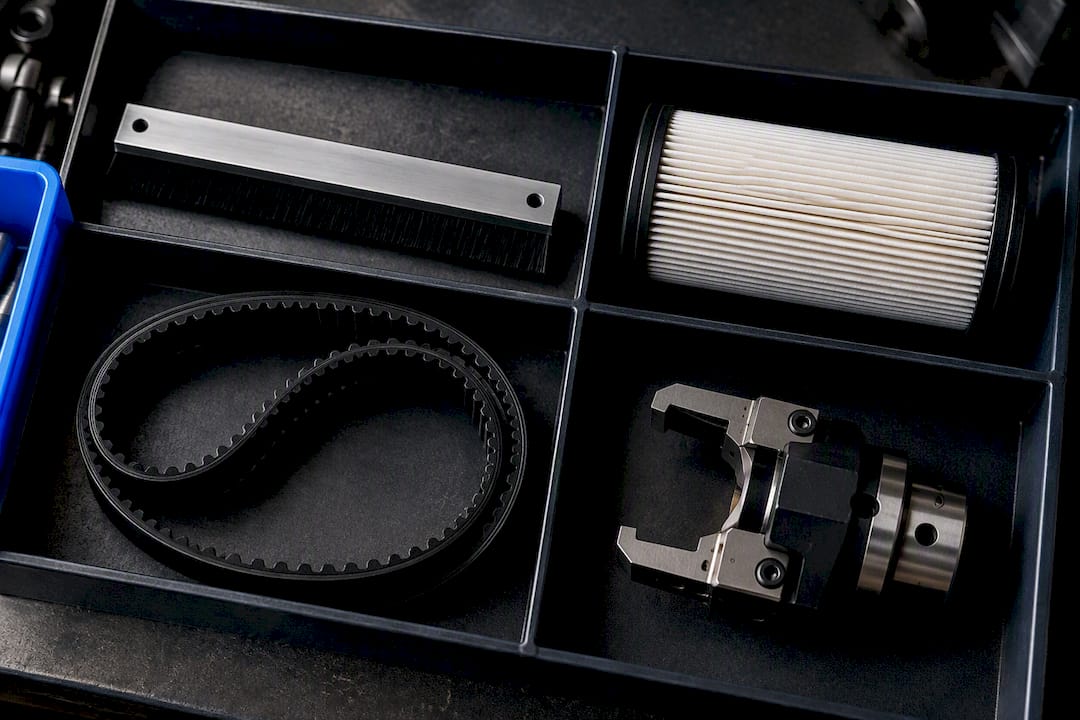
This is also where downtime tracking earns its place. A CMMS or work order workflow captures downtime causes, enforces PM tasks instead of letting them slip, and gives you the raw data to calculate OEE and mean time to repair. Keep common wear items (way wipers, filters, belts, ATC grippers) stocked with a reorder point tied to actual consumption, not a guess, so a $40 part never causes a $4,000 day of lost production.
Pro Tip: Train operators to log near miss observations, a slight noise, a faint vibration, a coolant smell that wasn't there yesterday, even when nothing seems broken. Those small entries are what eventually let you predict a failure before it happens instead of reacting after it does.
Troubleshooting: When to Stop the Machine and Call for Help
Some symptoms are worth a note in the log. Others mean you stop the spindle now.
Treat these as hard stop triggers: sudden coolant loss, a pressure drop in the hydraulic or way lube system, unexplained vibration or noise at spindle speed, a spindle temperature spike, or any sign of accuracy drift on a part that was in tolerance yesterday.
- Record what you observed. Note the time, the symptom, and any reading on the control display.
- Isolate if it's safe to do so. Stop the feed or the spindle rather than pushing through a cycle to see what happens.
- Take a sample measurement. A quick indicator check or a coolant reading can tell a technician more in two minutes than a verbal description ever will.
- Stop production for anything critical. A coolant loss or a pressure alarm is not a "finish the job first" situation.
- Capture evidence and convert it to a work order. Photos, vibration readings, and measurement values give the technician a real starting point instead of a guess.
Have replacement filters, belts, and common wear parts staged before an escalation happens, not ordered after.
A Shop Floor Note on What Actually Prevents Failures
The daily checks that feel too small to matter are the ones that save spindles and ways. A coolant top off, a way wipe down, a warmup ramp before a precision cut, none of it looks dramatic, but skipping it repeatedly is how a $200 bearing turns into a $15,000 spindle rebuild. Following this checklist consistently should mean fewer surprise stoppages and a maintenance log that actually helps you diagnose the next one.
What matters most isn't the task list itself. It's whether anyone writes down the as found condition before fixing it, and whether a slight vibration or an odd smell gets logged instead of ignored. Those near miss notes are the earliest warning system most shops already have and never use.
— Availzye
Why Most Shops Get Preventive Maintenance Half Right
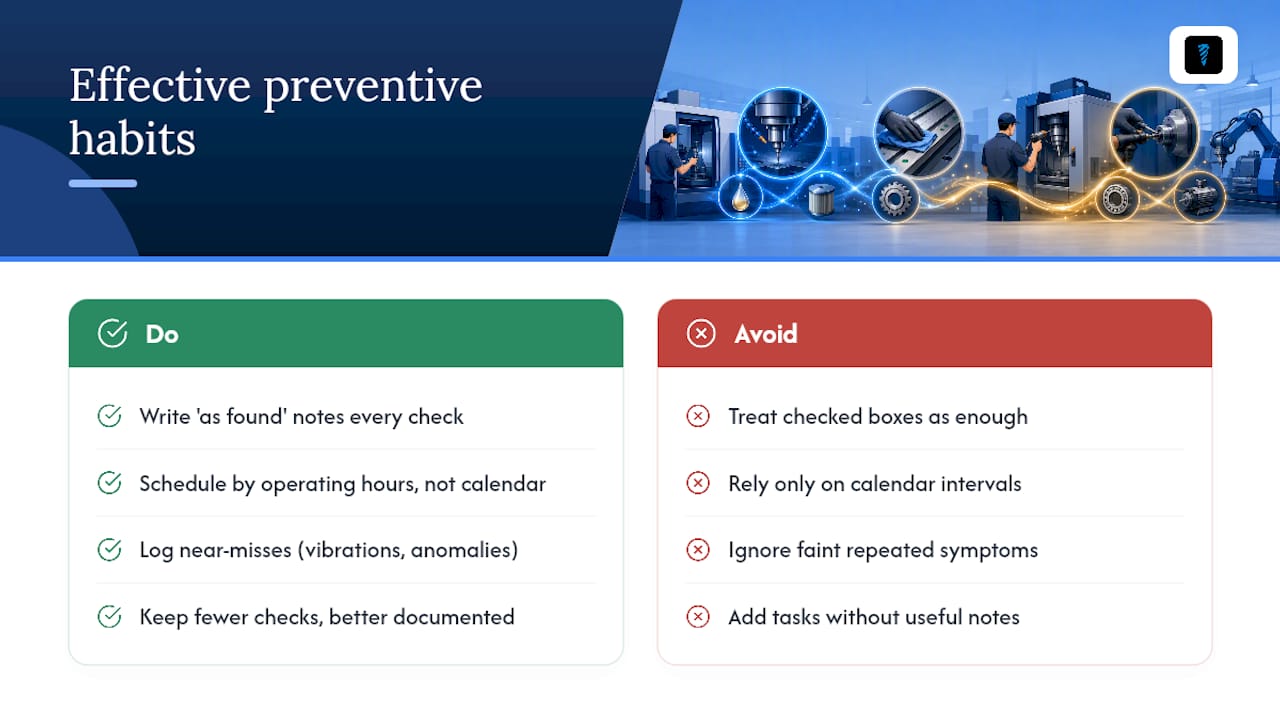
Most preventive maintenance advice focuses on the task list and ignores the habit that actually makes it work: writing down what you found before you fix it. A checklist with boxes checked but no as found notes is just a compliance record. It tells you maintenance happened, not what the machine is trying to tell you.
The conventional wisdom treats calendar scheduling as good enough. It isn't, once you have machines running different duty cycles on the same floor. Operating hour based intervals catch the high production machine before it fails and stop you from over servicing the one that barely runs.
If you take one thing from this checklist, make it the near miss log. A faint vibration noted three times in two weeks is worth more diagnostic value than any single inspection. Prioritize capturing that over adding more tasks to an already long list. Fewer, better documented checks beat a longer checklist nobody actually reads.
Let a Maintenance Tracker Carry the Paperwork
Running this checklist on paper works until you're managing six machines, three shifts, and a technician who's out sick during the week the 500 hour service was due. Availzyemachinistpro replaces that scramble with a Maintenance Tracker built specifically for the interval structure this article walks through: shift checks, weekly tasks, and hour based milestones logged against each machine instead of buried in a binder.

The platform pairs that tracker with a Tool Crib that flags low stock on the filters, wipers, and belts you need staged before an escalation, plus a Job Tracker that shows how a stopped machine is affecting active work orders in real time. An AI assistant is built in for quick machining reference questions when a technician needs a fast answer mid shift. Plans start at $9.99 CAD per month for Individual use, or $24.99 CAD per month for a Small Shop, with a Team tier at $49.99 CAD per month for full role based collaboration. Import a checklist template, add your first machine, and start a 7-day free trial to see whether your next PM cycle runs itself.
FAQ
What Are the 7 Elements of Maintenance?
Most frameworks cover inspection, cleaning, lubrication, adjustment, part replacement, calibration, and documentation. On a CNC machine, that translates directly into the daily, weekly, and hour based tasks in this checklist, from way wiping to geometric accuracy checks.
What Are the Maintenance Requirements for a CNC Machine?
Requirements scale with use: daily coolant, lubrication, and cleanup checks; weekly filter and toolchanger inspection; and hour based servicing at roughly 160 to 200, 500, 1000, and 2000 hours covering fluids, calibration, and spindle condition. OEM manuals set the baseline, and actual duty cycle determines how often you hit each interval.
What Are the 5 Types of Preventive Maintenance?
Common categories include time based, usage based (operating hours), predictive, condition based, and prescriptive maintenance. This checklist leans on usage based scheduling tied to operating hours, since it fits varying duty cycles better than a fixed calendar.
What Should a CNC Maintenance Checklist Include?
A complete checklist covers coolant level and concentration, lubrication points, chip and swarf removal, electrical cabinet hygiene, tooling and toolchanger condition, and documentation fields for as found notes and corrective actions. A platform like Availzyemachinistpro's Maintenance Tracker can hold that structure across every machine on the floor instead of a paper form per machine.
How Often Should CNC Machines Be Serviced?
Daily checks take about 10 to 20 minutes, weekly tasks run longer and need a technician, and deeper servicing lands at 160 to 200, 500, 1000, and 2000 operating hours depending on the task. High production machines hit those hour milestones faster than lightly used ones, so hours matter more than the calendar date.