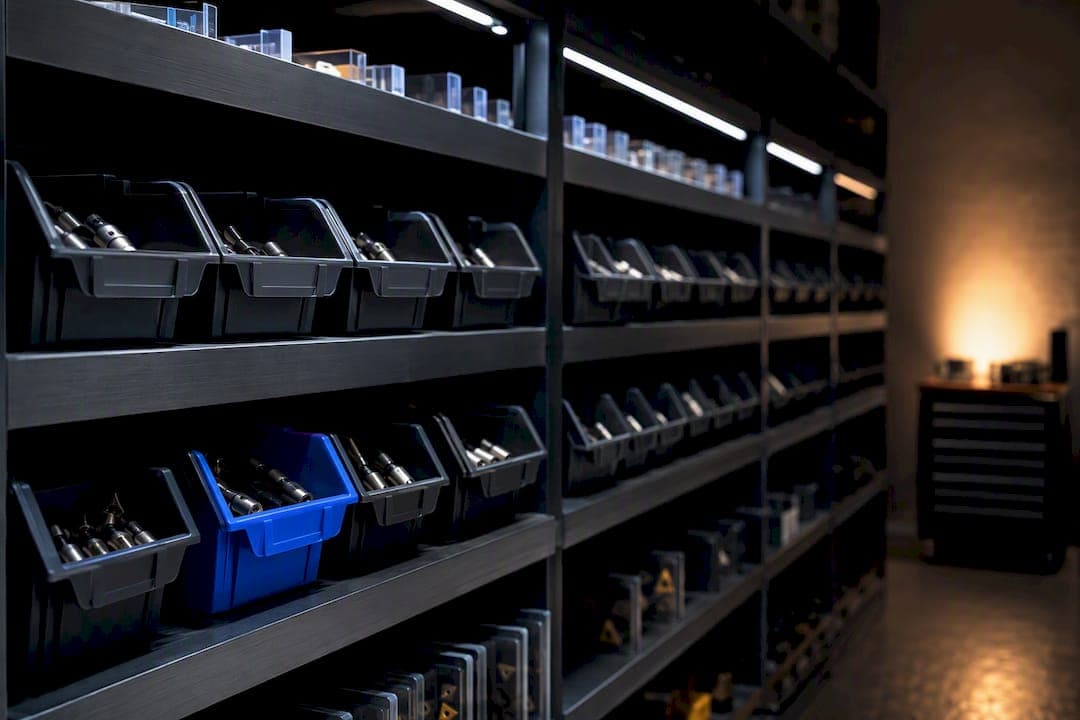
Min/max inventory is a rules-based replenishment method: when on-hand stock plus anything on order falls to your Min, you reorder up to your Max. It works best for stable-demand SKUs, MRO supplies, and tool cribs where usage doesn't swing wildly week to week. It struggles with intermittent demand or suppliers whose lead times bounce around, where a static Min gets stale fast.
TL;DR:
- Min/Max is most effective for stable-demand items like MRO supplies, but less suitable for SKUs with high variability or unpredictable lead times.
- Setting accurate Min and Max levels requires at least 90 days of demand data, actual lead time measurement, and periodic recalibration based on performance metrics.
- Common issues include outdated parameters, ignoring on-order stock in trigger logic, MOQ mismatches, and applying the same Min/Max across diverse SKUs.
- Combining Min/Max with automated systems like Availzye Machinist Pro reduces manual effort, prevents stale parameters, and improves inventory accuracy for shop floors.
- Segment SKUs by usage value, applying statistical safety stock for high-value items and simple Min/Max for low-value or predictable items to optimize replenishment.
Table of Contents
- What Min and Max Levels Actually Mean
- Formulas and a Worked Example You Can Drop Into a Spreadsheet
- When Min/Max Beats EOQ, Safety Stock, and Kanban (And When It Doesn't)
- How to Set Up and Maintain Min/Max Without It Falling Apart
- Why Min/Max Breaks Down (And How to Fix It)
- How Availzye Machinist Pro Fits Into a Min/Max Workflow
- Three Rules-of-Thumb for Shops Running Lean Teams
- Put Min/Max on Autopilot With Availzye Machinist Pro
- Sources
What Min and Max Levels Actually Mean
Min is the trigger point. Max is the target you refill to. Between those two numbers sits everything you need to know about how a part gets reordered without anyone staring at a spreadsheet every morning.
A few terms get used loosely, so let's pin them down:
- Min is the floor. Once total available stock hits this number, a replenishment order fires.
- Max is the ceiling. It's how much stock you want on hand right after that order lands.
- Safety stock is the buffer inside Min that covers demand spikes or late shipments.
- Reorder point (ROP) is often just another name for Min in continuous-review systems, and the line between the two terms is mostly semantic overlap depending on which software you're running.
The trigger logic itself is simple: if (on-hand + on-order) is less than or equal to Min, create a purchase order to bring stock back up to Max. That parenthetical matters more than it looks. Skip the on-order check and your system will flag a part as low even though three boxes are already sitting on a truck, and you'll double-order it. That single oversight is behind more excess-inventory write-offs than most shops realize.
Formulas and a Worked Example You Can Drop Into a Spreadsheet
The math behind Min/Max isn't complicated, but it does require you to know four numbers before you touch a formula. Get those four right and everything downstream holds up.
- D — average daily demand for the part
- L — lead time in days from order to delivery
- σLT — the standard deviation of demand during lead time (how much that demand actually varies)
- Z — the z-score tied to your target service level (1.65 for roughly 95%, 2.33 for roughly 99%)
From there, the core formulas are:
Safety stock (SS) = Z × σLT Min = SS + (D × L) Max = Min + order quantity (EOQ or a target cycle-stock amount)
If your demand and lead time barely move, a simpler version works fine: minimum stock equals average daily shipments times replenishment lead time, with no z-score required.
Here's a worked example for a carbide insert your shop burns through at a fairly steady clip.
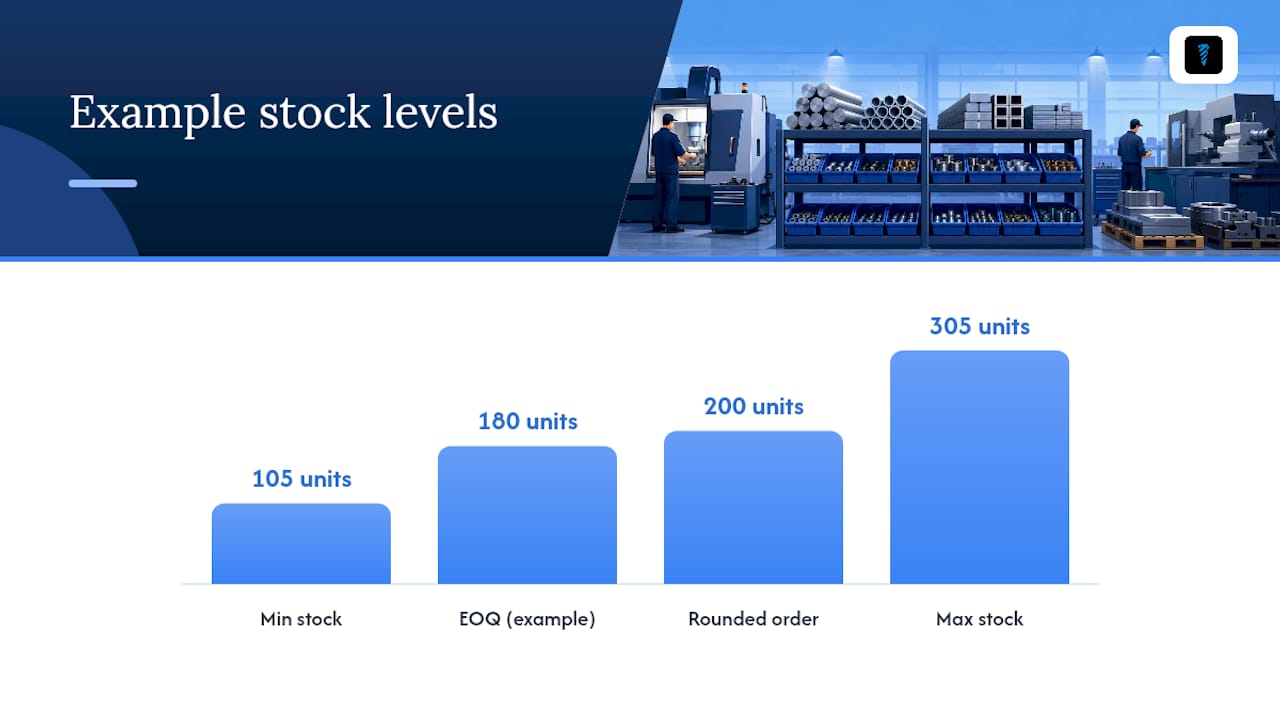
The Min of 105 units and Max of 305 units both round cleanly against a 50-unit MOQ, since 200 is a clean multiple. If your EOQ had landed at 180, you'd round up to 200 anyway rather than order a partial case and eat the packaging waste. That kind of rounding rule belongs in the item master, not in someone's head, or the next person to touch the part will second-guess the number.
When Min/Max Beats EOQ, Safety Stock, and Kanban (And When It Doesn't)
Min/Max isn't the only replenishment method, and pretending it fits every part is how shops end up drowning in slow-moving inventory. The right question isn't "which method is best" but "which method fits this SKU's demand pattern."
- Min/Max fits steady-demand consumables, MRO parts, and tool crib items where usage is predictable enough that a fixed trigger holds for months.
- Safety stock / ROP with statistical calculation fits high-value or high-variability items where a flat Min would either starve production or tie up cash in excess buffer.
- EOQ-driven ordering fits parts where order cost and holding cost trade off meaningfully, letting you calculate the true lowest-cost batch size rather than guessing at a round number.
- Periodic review fits low-value items you're comfortable checking on a fixed schedule (weekly, monthly) rather than triggering continuously.
- Kanban fits shop-floor consumables with visual, physical replenishment signals, usually paired with very short lead times.
The honest trade-off is accuracy against complexity. Min/Max is easy for shop floor staff to execute correctly because it's just two numbers and a trigger, but that simplicity comes at the cost of responsiveness when demand shifts. Most operations don't need to pick one method and apply it everywhere. Segment your SKUs into A, B, and C classes based on usage value, and let the method match the class: tight statistical control on your A items, straightforward Min/Max on your B and C items.
How to Set Up and Maintain Min/Max Without It Falling Apart
Getting Min/Max running is the easy part. Keeping it accurate six months later is where most shops quietly fail.
- Pull your demand history. You need at least 90 days of consumption data per SKU, ideally a full year if the part has any seasonality.
- Measure actual lead times. Don't use the supplier's quoted lead time. Use what you've actually experienced, including the slow months.
- Set a service level target per SKU class. A critical tool doesn't need the same 99% coverage as a cheap fastener.
- Calculate SS, Min, and Max, then round to match MOQ and pallet constraints.
- Load Min and Max into your ERP or inventory system at the location and SKU level, not as a single blanket number across sites.
- Confirm the trigger checks on-hand plus on-order, and if your platform doesn't support that natively, add a manual hold flag before any suggested order gets approved.
- Schedule a nightly batch run that checks every SKU against its Min and flags anything at or below threshold.
Once it's running, watch four numbers: fill rate (orders shipped complete and on time), stockout frequency, days of inventory on hand, and your inventory turnover ratio. A healthy fill rate for MRO and tooling generally sits north of 95%. If yours is dropping, your Min is set too low or your lead time has drifted since you calculated it.
Recalibrate on a cadence, not a whim. Quarterly for your baseline B and C items, monthly for anything classified as a fast mover, and immediately whenever a supplier changes lead time or you swap vendors entirely.
Pro Tip: Build a standing calendar reminder for parameter reviews rather than waiting for a stockout to remind you. By the time a machinist is standing at an empty bin, the fix is already three weeks late.
Why Min/Max Breaks Down (And How to Fix It)
Most Min/Max failures trace back to the same handful of causes, and none of them require a system overhaul to fix.
- Stale parameters. Demand shifted six months ago and nobody updated Min. Fix: put every SKU on a recalibration schedule, not just the ones that scream loudest.
- Ignoring on-order stock in the trigger. This causes duplicate purchase orders and sudden excess inventory. Fix: audit your trigger logic and confirm on-order is actually part of the check, not just on-hand.
- MOQ mismatches. Your calculated order quantity doesn't align with what the supplier will actually ship. Fix: bake MOQ rounding into the Max formula itself, documented in the item master so it's not tribal knowledge.
- One-size-fits-all Min/Max across wildly different SKUs. Fix: re-segment by ABC class and apply a hybrid approach, statistical safety stock for your A items, fixed buffers for your C items.
If you're still seeing stockouts after fixing all four, the SKU probably has demand or lead-time variability too extreme for Min/Max, and it's time to move it into a proper statistical safety-stock model.
How Availzye Machinist Pro Fits Into a Min/Max Workflow
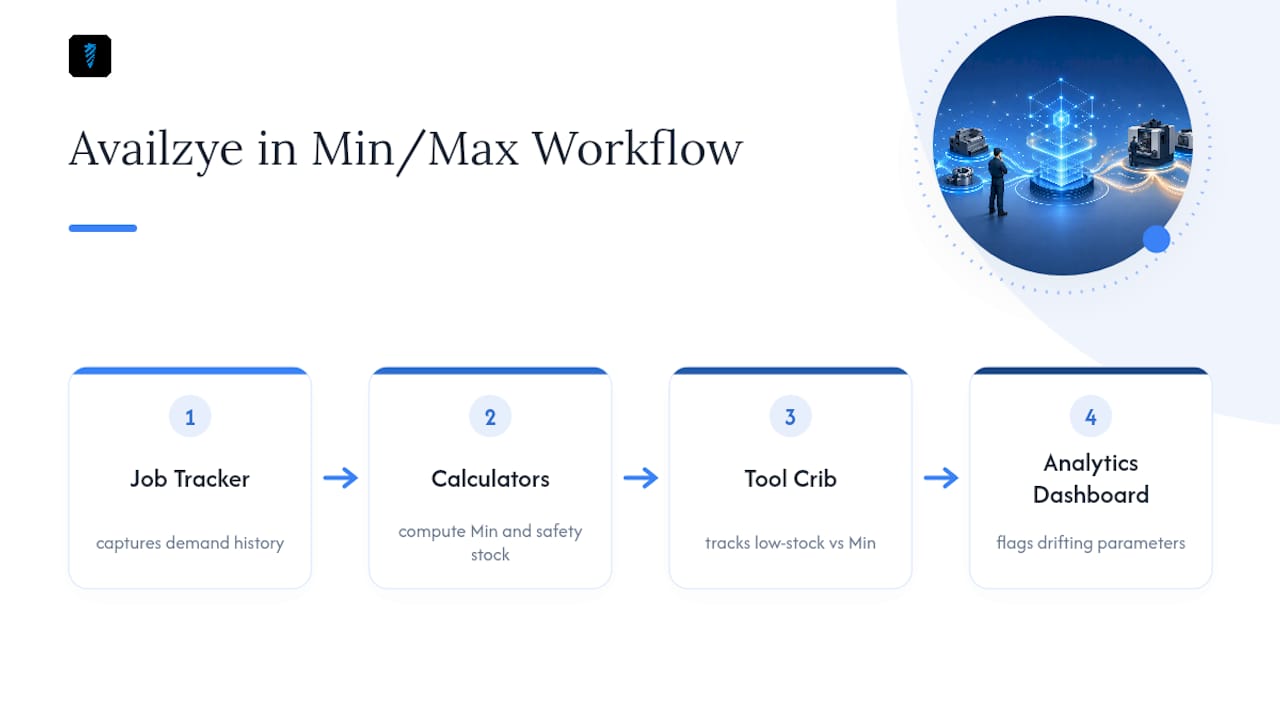
Tool crib management is where Min/Max earns its keep in a machine shop, and it's where the calculation tends to get skipped entirely because nobody wants to run z-scores by hand for 400 tool numbers. Availzye Machinist Pro's Tool Crib inventory system tracks low-stock alerts against the Min you set per tool, while Job Tracker consumption data gives you the actual demand history to calculate that Min correctly instead of guessing. The analytics dashboard surfaces which tools are drifting toward stale parameters before they trigger a stockout on the floor, and the platform's calculators handle the safety-stock math directly, so recalibration isn't a quarterly spreadsheet chore anymore.
Three Rules-of-Thumb for Shops Running Lean Teams
Focus your effort on the top 20% of SKUs driving 80% of your consumption value, because that's where a calculation error actually costs you money. Automate the refill check so nobody has to remember to look, and make Min visible right on the bin itself, a printed number beats a buried spreadsheet every time someone's in a hurry. Beyond that, the single habit that separates shops with working Min/Max from shops fighting constant stockouts is a disciplined, calendared parameter review. Skip that, and the best formula in the world decays into noise within two quarters.
— Availzye
Put Min/Max on Autopilot With Availzye Machinist Pro
Availzye Machinist Pro turns the Min/Max math in this guide into something your team actually maintains, instead of a spreadsheet that gets stale by March. The Tool Crib module fires low-stock alerts the moment on-hand plus on-order hits your Min, logs tool life automatically, and hands you check-in/check-out history so your demand data stays accurate without manual entry.

Pair that with the Tool Database for tracking consumption by job and the analytics dashboards for spotting drift before a stockout hits the floor, and recalibration stops being a quarterly scramble. Start the 7-day free trial and load your own Min/Max numbers into the tool crib setup today.
Sources
- Min max inventory system how it works — 5 proven steps
- Inventory Min/Max Levels: What & How to Calculate | Warehouse & 3PL Logistics Encyclopedia
- Min/Max Inventory Method
- How do you calculate minimum stock levels in your logistics warehouse?